
WooCommerce product filtering can feel simple when a store has a few hundred products. Add a category filter, a few attributes, maybe a price filter, and the job looks done.
But the situation changes when the store grows.
A WooCommerce shop with tens of thousands of products is different. Every category, attribute, tag, stock value, product image, and sorting option adds more data to process. A product filter that feels fast on a small catalog can become slow when the store has 10,000, 30,000, or 60,000+ products.
That is the problem Quick Search Pro was built to solve.
Quick Search Pro is a high-performance WooCommerce product filtering plugin designed for large product catalogs. Instead of relying only on normal WordPress and WooCommerce queries for every filter action, it uses optimized product index tables and a fast request path designed specifically for filtering.
In the current demo shop, Quick Search Pro is tested with more than 60,000 WooCommerce products.

Why normal WooCommerce filters can become slow
Many WooCommerce filter plugins describe themselves as Ajax filters. Ajax can make the shopping experience feel smoother because the whole page does not need to reload after every filter change.
But Ajax alone does not make a filter fast.
If the server still needs to run heavy WordPress, WooCommerce, taxonomy, meta, and theme logic for every filtering request, the customer can still end up waiting. The browser may stay on the same page, but the backend query can still be slow.
This becomes especially visible in large catalogs where the customer can filter by many different values, such as:
- Product categories
- Subcategories
- Product attributes
- Product tags
- Brands
- Sizes
- Sorting options
For small shops, this may not matter much. For large WooCommerce stores, the filtering architecture becomes important.
Quick Search Pro is built differently
Quick Search Pro is not just another frontend Ajax layer.
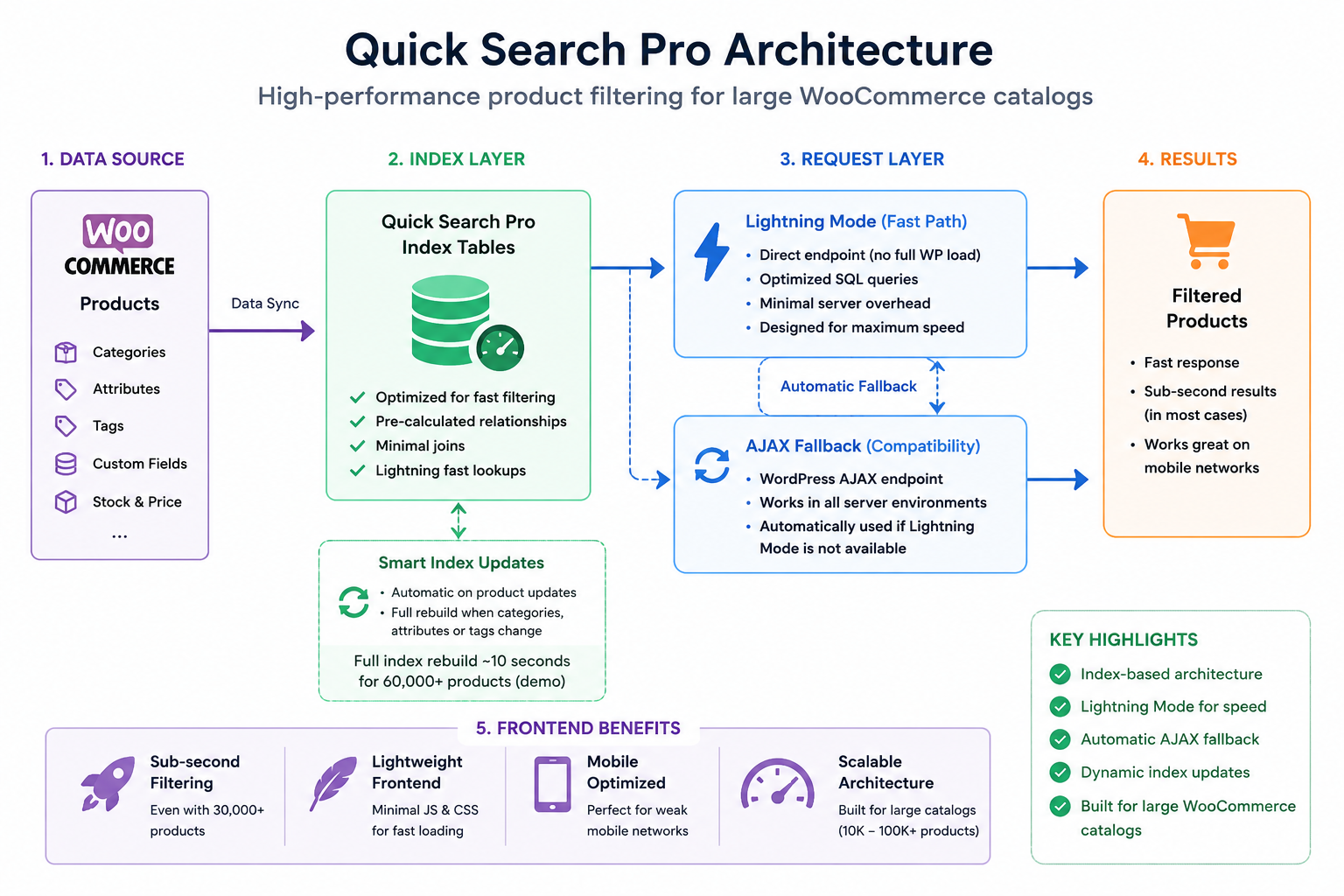
It creates optimized product index data for filtering. This allows the plugin to search and narrow product results without depending on the full normal WooCommerce query path for every click.
The plugin is designed around three main ideas:
- Index the data needed for filtering
- Use a fast request path when the server supports it
- Fallback automatically when needed
This makes the plugin suitable for stores where filtering speed is not just a nice extra, but a core part of the shopping experience.
Tested with a 60,000+ product WooCommerce demo store
The current Quick Search Pro demo shop contains more than 60,000 products.
That matters because many filtering solutions look fast in small demos. A demo with a few hundred or a few thousand products does not always reveal the real performance limits.
In the Quick Search Pro demo environment, rebuilding the product filtering index for around 60,000 products takes about 10 seconds.
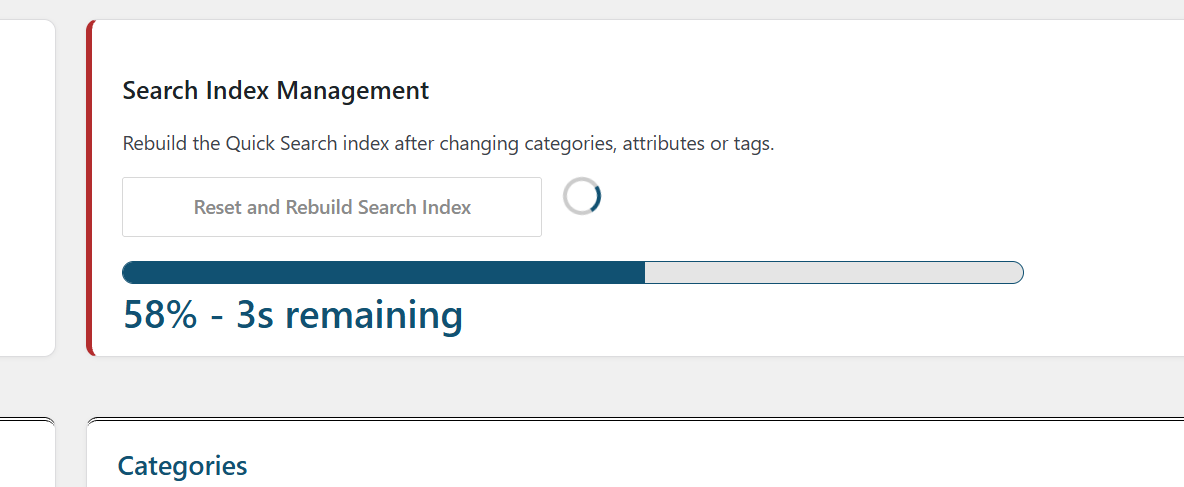
The full index rebuild is mainly needed when product categories, attributes, or tags change. Normal product updates can be handled dynamically, so the store does not need a full manual rebuild after every small product change.
That is important for real WooCommerce stores where prices, stock quantities, and imported product data may change regularly.
Demo performance examples
The goal of Quick Search Pro is not only to work on a large store, but to keep the filtering experience fast.
In the current demo shop, most filter actions return in well under one second. Even broad result sets are designed to remain fast.
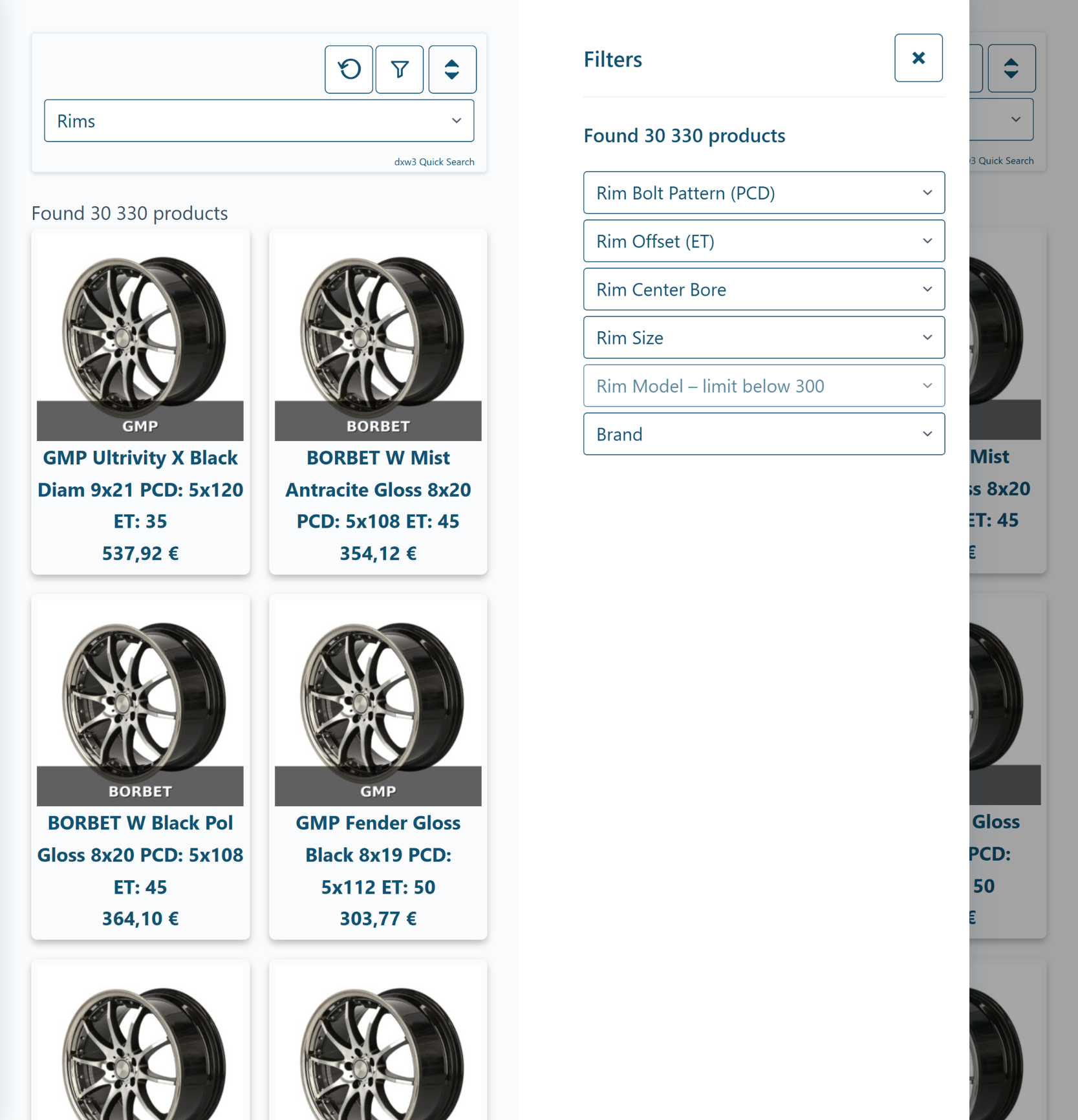
For example, selecting the rims category in the demo shop searches through a large result set of around 30,000 matching products. In testing, this type of broad category action has returned in roughly 500ms.

Typical demo results:
| Test | Demo result |
|---|---|
| Demo catalog size | 60,000+ products |
| Full index rebuild | About 10 seconds |
| Broad rims category result set | Around 30,000 products |
| Broad category filtering test | Around 500ms |
| Normal filtering actions | Sub-second in the demo shop |
| Normal product updates | Dynamic index updates |
Performance always depends on the server, catalog structure, hosting environment, active plugins, and selected filters. But the important point is that Quick Search Pro is designed around a filtering architecture that can handle large catalogs efficiently.

Lightning Mode and Ajax fallback
Quick Search Pro includes a high-speed request path called Lightning Mode.
Lightning Mode is optimized for performance. It is designed to reduce overhead and return product filtering results quickly, especially in large stores where every extra layer can slow down the customer experience.
This matters especially on weaker mobile networks.
A slow product filter is not only a server problem. It becomes a user experience problem. On mobile, every extra script, large response, and delayed request can make the shop feel heavier.
Quick Search Pro is designed to keep the frontend lightweight and let the optimized backend filtering logic do the heavy work.
But not every server environment is identical. Some hosting setups, security rules, cache configurations, or server restrictions may not allow the fastest request path to work reliably.
That is why Quick Search Pro can automatically use a slightly slower WordPress Ajax path when needed.
The goal is simple: use the fastest available mode when possible, but keep the plugin usable across different WordPress hosting environments.
Lightweight frontend performance
Some product filter plugins load a lot of frontend code. That can make the page heavier before the customer even starts filtering.
Quick Search Pro takes a different approach.
The frontend is kept lightweight because the main filtering work is handled by optimized server-side data structures. The browser does not need to load a large filtering application just to let customers narrow down products.
This is especially important for:
- Mobile shoppers
- Stores with large category pages
- Stores with many product attributes
- Stores where speed affects conversion
- Shops where customers compare many filter combinations
In large WooCommerce stores, performance is not only about the first page load. The filtering experience after the customer starts interacting with the shop is just as important.
Why indexing matters
Indexing is the part that makes fast filtering possible.
Instead of asking WooCommerce to calculate everything from the full product database on every request, Quick Search Pro prepares the data needed for filtering in advance.
This is especially useful when products have many attributes, categories, and tags.
In internal comparison testing, a well-known premium filtering plugin could not complete indexing of the same 60,000-product demo catalog under the available memory limit. Quick Search Pro rebuilt the demo index in about 10 seconds in the same environment.
That is the difference between a filter that is added on top of WooCommerce and a filter architecture designed for large catalogs from the beginning.
Who Quick Search Pro is built for
Quick Search Pro is especially suitable for WooCommerce stores where product filtering speed matters.
Typical use cases include:
- Large WooCommerce catalogs
- Tire and rim stores
- Spare part stores
- B2B product catalogs
- Technical product catalogs
- Import-heavy WooCommerce stores
- Stores with many product attributes
- Stores where customers need to narrow down products quickly
It is not built mainly for tiny stores with a few products. A small store can use many different filter plugins successfully.
Quick Search Pro is built for the point where normal filtering starts to feel slow, heavy, or unreliable.
Ajax is useful, but architecture is more important
Ajax filtering is now common in WooCommerce. Many plugins offer it.
But Ajax is only the request method. It does not automatically solve the deeper performance problem.
The real question is:
What happens after the filter request reaches the server?
If every click still depends on heavy WordPress and WooCommerce queries, Ajax can only hide part of the problem. The customer may avoid a full page reload, but they may still wait for the results.
Quick Search Pro focuses on the deeper layer: the data structure and request path behind the filter.
That is why the plugin can be fast even when the product catalog is large.
Designed for real WooCommerce stores
Large WooCommerce stores are rarely simple.
They often have:
- Product imports
- Large attribute sets
- Many categories
- Regular stock updates
- Price updates
- Product image handling
- Cache plugins
- Mobile traffic
- Different hosting environments
Quick Search Pro is built with this reality in mind.
The plugin supports a fast Lightning Mode request path for speed, but it can also fall back to a WordPress Ajax path when the server environment requires it. This gives store owners and developers a practical balance between performance and compatibility.
Try the live demo
The best way to understand Quick Search Pro is to try it on a large catalog.
The demo shop is designed to show how the plugin behaves with more than 60,000 WooCommerce products, including broad categories, attributes, tags, sorting, and pagination.
Try the demo and test different filter combinations.
Get Quick Search Pro
Quick Search Pro is built for WooCommerce stores where filtering performance matters.
If your store has a large catalog, many product attributes, or slow filtering with your current setup, Quick Search Pro is designed to solve that problem with a faster architecture.
Browse the WooCommerce filtering guides and benchmarks.
For more information, please contact here.